
Lightweight Data Transformations in Fabric: A duckrun Demo
Are your tables in OneLake in the billions of rows? If not, Spark might be a hammer that’s too big for your nails. For focused datasets that aren’t mission-critical, single-process tools like DuckDB can deliver the same value while using just a sliver of capacity—especially valuable when your warehouse or SQL endpoints are already heavily utilized.
In this post, we’ll explore transforming a NYC Open Data collisions data set using duckrun, which simplifies the orchestration, testing, and documentation of delta lake tables in Fabric (kudos to Mimoune Djouallah for building it).
Currently, duckrun functions as both a Fabric notebook utility for reading and writing delta tables with DuckDB SQL and a dbt adapter. This post focuses on the latter—how to use it as a single-process transformation tool that applies software development best practices to your data work.
Disclaimer:
duckrunis an open-source library with only one maintainer; it makes no guarantees and is explicit about this. While its utility is clear and value can be high, you should approach its use with caution and avoid applying it in production scenarios, or at least ones that are mission critical. If you do use it, plan to test, test, test and ensure you have other options at the ready.
Prerequisites
Before getting started, you’ll need a few things in addition to an empty Fabric workspace:
azcopyto sync your dbt code into OneLake (or simply upload directly via the lakehouse UI)- An Azure DevOps or GitHub account to connect to your Fabric workspace
The complete code for this walkthrough is available in this GitHub repo. Clone it and update the workspace and lakehouse GUIDs to match your environment:

Understanding dbt Structure
Since duckrun wraps dbt-duckdb, your project follows standard dbt conventions: SQL files organized in a directory structure and contextualized with YAML configuration. Unlike notebook-based transformations, dbt projects keep code modular and well-organized.
The tree structure below shows a typical dbt project structure. The key directories are:
- macros: Reusable SQL snippets you want to repeat across your project
- models: Your transformation SQL files, organized into layers:
- staging: Initial transformations on raw data (can have subdirectories like
bronze) - intermediate: Views or materialized tables used by downstream models
- marts: Final business logic tables
- staging: Initial transformations on raw data (can have subdirectories like
├── macros
│   ├── create_int_sk.sql
│   └── generate_schema_name.sql
├── models
│   ├── intermediate
│   │   ├── collision_reason.sql
│   │   ├── collision_vehicle_type.sql
│   │   └── schema.yml
│   ├── marts
│   │   ├── bridge_reason.sql
│   │   ├── bridge_vehicle_type.sql
│   │   ├── dim_date.sql
│   │   ├── dim_location.sql
│   │   ├── dim_reason.sql
│   │   ├── dim_vehicle_type.sql
│   │   ├── fact_collision.sql
│   │   └── schema.yml
│   └── staging
│       ├── bronze
│       │   └── collisions.sql
│       └── schema.yml
├── dbt_project.yml
└── profiles.yml
Configuration Files
The three critical YAML files are:
-
profiles.yml: Tells
duckrunwhere to write your model outputs. Use environment variables for flexible multi-environment deployments:collisions_warehouse: target: dev outputs: dev: type: duckrun schema: cdw root_path: "{{ env_var('TARGET_LH_PATH') }}/Tables" -
dbt_project.yml: Determines which profile to use and sets configuration like schema names for each modeling layer
-
schema.yml: Defines data sources, tests, and documentation for your models. Here’s how to reference external data in your lakehouse:
sources:
  - name: bronze_lakehouse
    description: "Raw data from NYC Open Data collisions dataset"
    tables:
      - name: collisions
        description: "Raw collisions table. Staging normalizes and documents columns."
        meta:
          plugin: duckrun
          format: csv
          location: "{{ env_var('TARGET_LH_PATH') }}/Files/nyc-open-data/collisions.csv"
Writing Your Transformations
Your SQL transformations use DuckDB SQL with Jinja templating to manage dependencies. The source() and ref() functions link to your defined sources and upstream models:
-- You don't need the schema config in every model, unless you want a custom schema name
-- This is handled by the macro in the macros directory

{{ config(schema='staging') }}

-- silver query
SELECT
  "CRASH DATE" AS crash_date,
  CAST("CRASH TIME" AS VARCHAR) AS crash_time,
  CAST("CRASH DATE" + "CRASH TIME" AS TIMESTAMPTZ) AS crash_timestamp,
  CAST(LATITUDE AS DECIMAL(9,6)) AS latitude,
  CAST(LONGITUDE AS DECIMAL(9,6)) AS longitude,
  LOCATION AS location,
  BOROUGH AS borough,
  IFNULL(UPPER("ON STREET NAME"),'STREET UNKNOWN') AS on_street_name,
  IFNULL(UPPER("CROSS STREET NAME"),'CROSS STREET UNKNOWN') AS cross_street_name,
  IFNULL(UPPER("OFF STREET NAME"),'OFF STREET UNKNOWN') AS off_street_name,
  "NUMBER OF PERSONS INJURED" AS number_of_persons_injured,
  "NUMBER OF PERSONS KILLED" AS number_of_persons_killed,
  "NUMBER OF PEDESTRIANS INJURED" AS number_of_pedestrians_injured,
  "NUMBER OF PEDESTRIANS KILLED" AS number_of_pedestrians_killed,
  "NUMBER OF CYCLIST INJURED" AS number_of_cyclist_injured,
  "NUMBER OF CYCLIST KILLED" AS number_of_cyclist_killed,
  "NUMBER OF MOTORIST INJURED" AS number_of_motorist_injured,
  "NUMBER OF MOTORIST KILLED" AS number_of_motorist_killed,
  UPPER("CONTRIBUTING FACTOR VEHICLE 1") AS contributing_factor_vehicle_1,
  UPPER("CONTRIBUTING FACTOR VEHICLE 2") AS contributing_factor_vehicle_2,
  UPPER("CONTRIBUTING FACTOR VEHICLE 3") AS contributing_factor_vehicle_3,
  UPPER("CONTRIBUTING FACTOR VEHICLE 4") AS contributing_factor_vehicle_4,
  UPPER("CONTRIBUTING FACTOR VEHICLE 5") AS contributing_factor_vehicle_5,
  COLLISION_ID AS collision_id,
  UPPER("VEHICLE TYPE CODE 1") AS vehicle_type_code_1,
  UPPER("VEHICLE TYPE CODE 2") AS vehicle_type_code_2,
  UPPER("VEHICLE TYPE CODE 3") AS vehicle_type_code_3,
  UPPER("VEHICLE TYPE CODE 4") AS vehicle_type_code_4,
  UPPER("VEHICLE TYPE CODE 5") AS vehicle_type_code_5
FROM {{ source('bronze_lakehouse', 'collisions') }};
Deploying Your dbt Project to Fabric
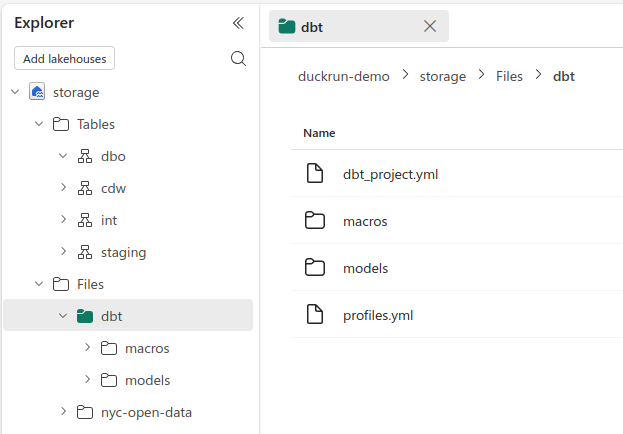
With your dbt project properly structured, copy it to the files section of your lakehouse. I prefer azcopy sync for iterative development:
export DBT_LAKEHOUSE_URL="https://onelake.dfs.fabric.microsoft.com/$DUCKRUN_WORKSPACE_ID/$DUCKRUN_LH_ID/Files/dbt"

azcopy sync "./dbt" "$DBT_LAKEHOUSE_URL" \
    --recursive=true \
    --delete-destination=true \
    --trusted-microsoft-suffixes "fabric.microsoft.com"
Your dbt directory is now ready to be accessed from a Fabric notebook:
Running dbt from Your Fabric Notebook
Your Fabric notebook acts as a simple orchestrator. It needs to:
- Install
duckrun - Execute your dbt project
- Report success or failure
- Generate documentation
Install duckrun and restart the kernel:
!pip install -q duckrun --upgrade
notebookutils.session.restartPython()
Then run your dbt project:
import os
from dbt.cli.main import dbtRunner, dbtRunnerResult

workspace = "<your-workspace-id>"
lh_art_id = "<your-lakehouse-artifact-id>"
os.environ["TARGET_LH_PATH"] = f"abfss://{workspace}@onelake.dfs.fabric.microsoft.com/{lh_art_id}"
dbt_project_dir = "/lakehouse/default/Files/dbt"

dbt = dbtRunner()

cli_args = [
    "build",
    "--project-dir", dbt_project_dir,
    "--profiles-dir", dbt_project_dir
]

res: dbtRunnerResult = dbt.invoke(cli_args)

for r in res.result:
    print(f"{r.node.name}: {r.status}")
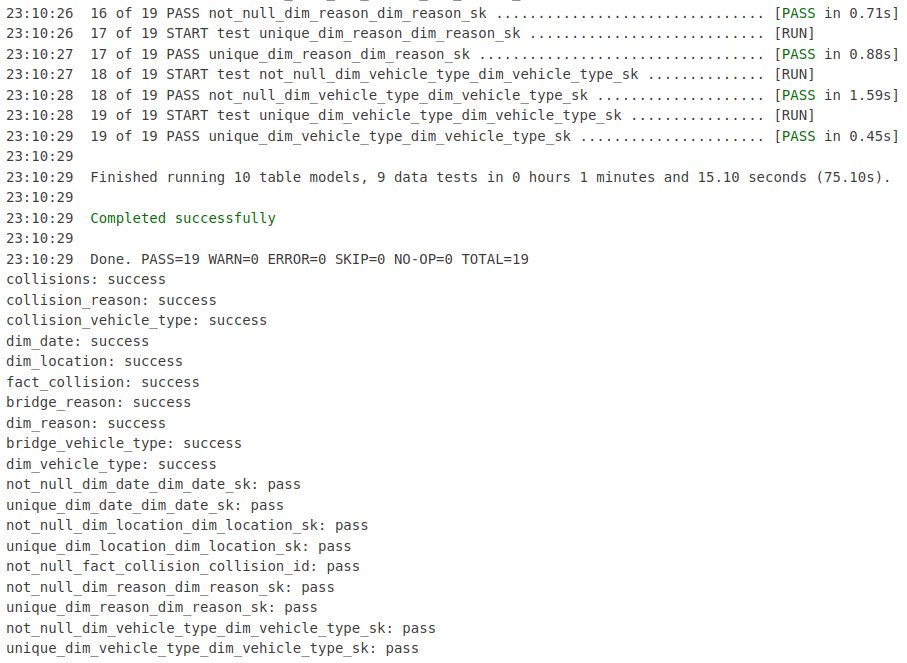
With everything configured correctly and no SQL or test errors, your run completes successfully:
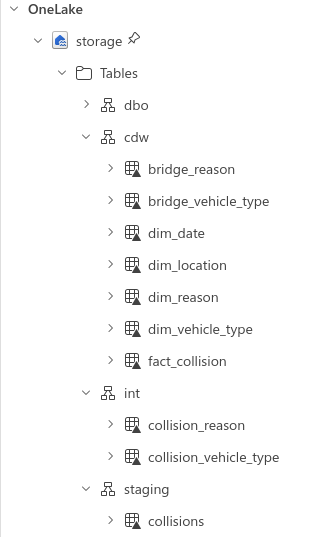
Your tables are now organized into the schemas you specified, ready for downstream analytics:
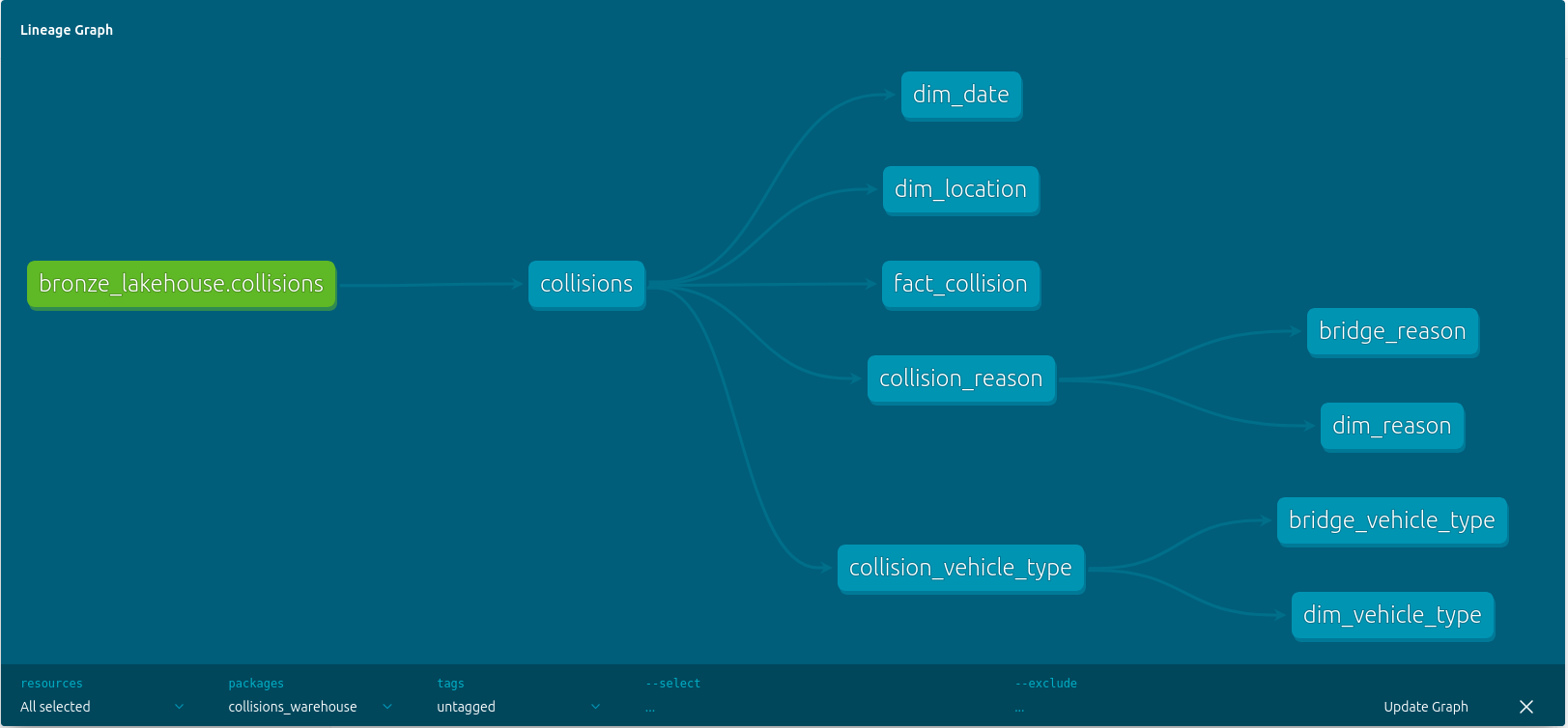
The file at dbt/target/static_index.html will be created, where you can access a lineage graph from within the dbt documentation interface:
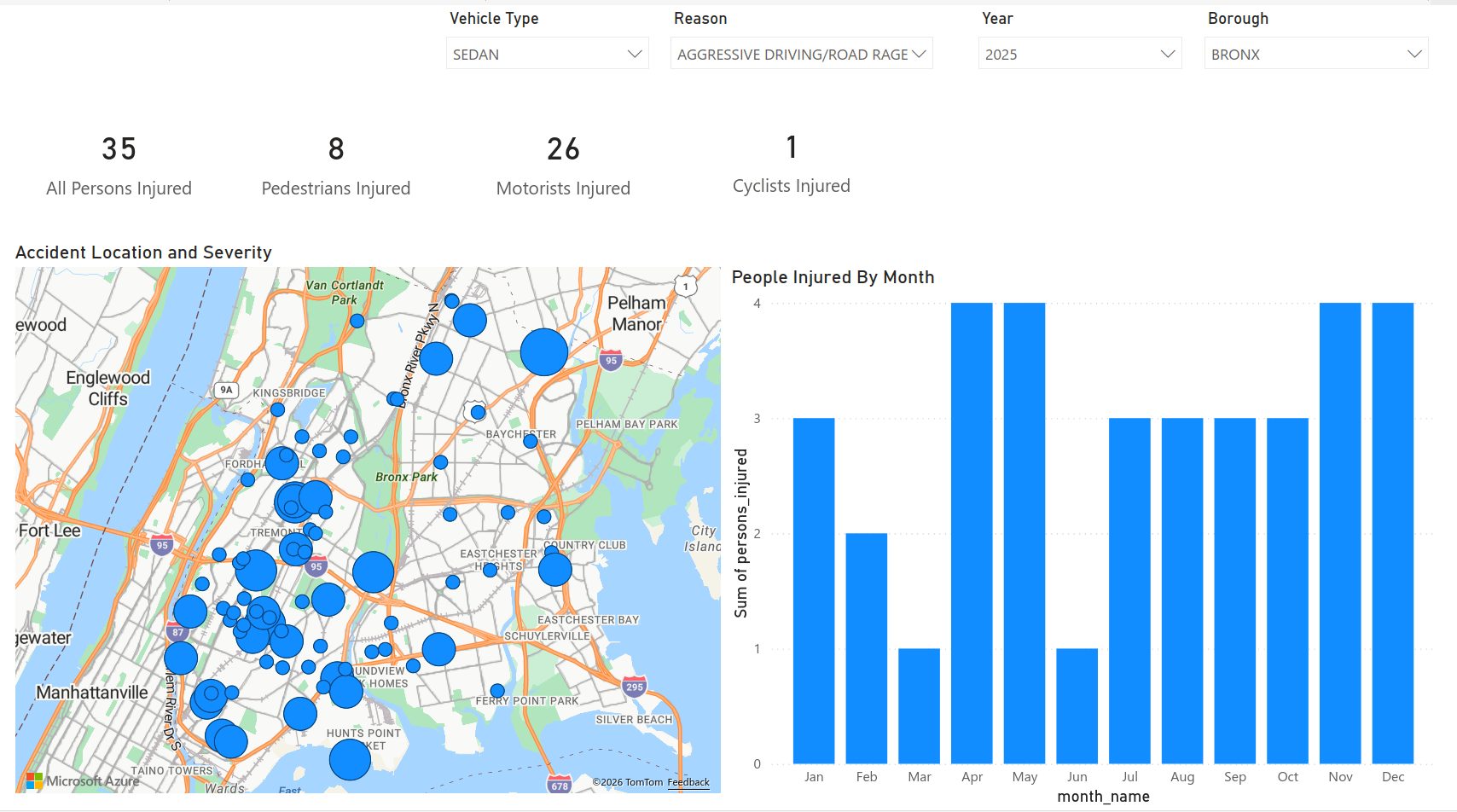
Load these into a semantic model and visualize with your favorite BI tool:
Wrapping Up
duckrun brings a mature feature set to a Fabric-specific need: transforming data with DuckDB SQL and materializing results as delta tables. You get organization, testing, tracing, and documentation that notebooks alone can’t provide.
If a simple query plus write_deltalake() works for your use case, you probably don’t need duckrun. However, for moderately complex transformations that warrant more structure, it’s worth having in your toolkit.